
About the Connection String
DoseControl software is installed on a computer and connects to a Microsoft SQL Server database using a connection string entered into the software. DoseControl data is stored in its application database.
A connection string format can look like the following:
Data Source=<servername\datasource>;Initial Catalog=GEXApp;User ID=gexapp;Password=<your GEXApp login password>;MultipleActiveResultSets=true;

Create a Connection String for DoseControl
1 Use SQL Server Management Studio (SSMS) to find the information to write your connection string. If SSMS is still open, close it and reopen it. If not, you can launch SSMS from the start menu.
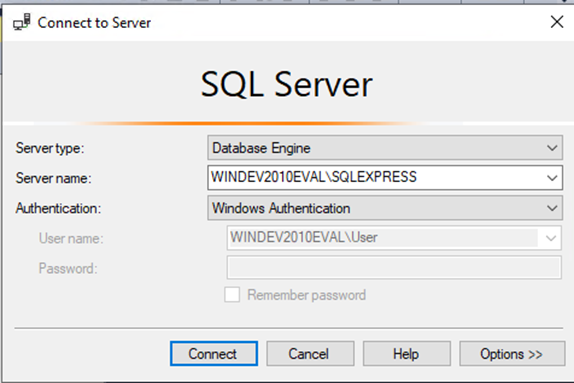
2 To get the Data Source value for your connection string, make note of the Server name (Data Source) that appears in the Connect to Server window. Based on the preceding steps it should appear as <YOURCOMPUTERNAME>\SQLEXPRESS (including the backslash). For example, the GEX test environment appears as WINDEV2010EVAL\SQLEXPRESS:
3 The Initial Catalog value is the name of the database where the DoseControl data will reside. It will be named gexapp. (You can name the database whatever you want!)
4 The connection string’s User ID value is the SQL user login. (Note: You created the SQL Authentication logins when you set up your Microsoft SQL Server.)
See DoseControl Application Database Setup and Management for instructions.
5 The connection string’s Password value is the SQL user login password. (Note: You created the SQL Authentication logins when you set up your Microsoft SQL Server.)
You may copy this and use the following connection string when installing DoseControl, but you must change the Data Source and Password values to your specific values:
Data Source=<servername\datasource>;Initial Catalog=GEXApp;User ID=gexapp;Password=<your GEXApp login password>;MultipleActiveResultSets=true;
6 Keep a copy of this connection string. You will enter the connection string in DoseControl after installing the software as part of the setup process. See DoseControl Software Installation Instructions.