
This document was formerly published as GEX Doc. No. 100-268 Integration with DoseControl® Dosimetry Software - User Guide
1 DESCRIPTION
This document provides instructions for how to import and export data into DoseControl® software from other systems (ERP, MES, QMS, SAP, NetSuite, PeopleSoft, etc.).
DoseControl software has a built-in structure to simplify and minimize costs to integrate with other systems - the standard Import and Export tables that are separate from the application database. If you upgrade to a newer version of DoseControl software, your integration remains intact.
Use a database professional within your own organization to push data into the SQL import tables and pull data from the SQL export tables.
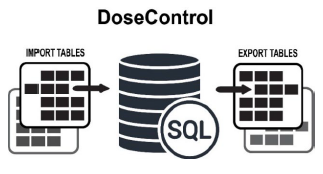
Some integration examples:
-
Import process and product data into DoseControl software: Make it easy for the operator to simply click and open the imported dosimetry report and begin measurements. Imported information reduces input errors.
-
Dosimeter IDs that were included in the irradiation process run.
-
Min and max dose specifications and correlation ratios.
-
Process-specific information such as Catalog Number, Product Description, etc.
-
-
Export process, product, and dosimeter measurement data from the DoseControl software: Send dosimetry information to other systems for product release processes, process control, process data analysis, and the analysis of dosimetry related metrics.
1.1 Compliance and Validation
GEX has validated the functions of the tables and the population of data into these tables as a standard function of DoseControl. It is up to the user to validate the integration with these tables and the introduction of integrated data into and, if applicable, out of the software. This includes validation that the integrated data is both used and displayed within DoseControl, as applicable.
1.2 Definitions
Dosimeter: A device that, when irradiated, exhibits a quantifiable change in some property of the device that can be related to absorbed dose in a given material using appropriate analytical instrumentation and techniques. Dosimeters are packaged in a pouch, and a pouch may contain 1 dosimeter replicate (dosimeter A), 2 dosimeter replicates (dosimeter A and B), 3 dosimeter replicates (dosimeter A, B and C), or 4 dosimeter replicates.
Dosimeter ID: Unique ID for a dosimeter. DoseControl software enforces the rule that all Dosimeter IDs must be unique in the system.
Absorbance (A): The absorbance value measured by the spectrophotometer. Ao is the original (background) absorbance of an unirradiated dosimeter. Ai is the average Absorbance value for the measured absorbance.
Thickness (T): Dosimeter thickness value.
Response (R) : The Calculated Response value for the dosimeter (Ai – Ao / T) where Ai is the average absorbance of dosimeter replicates A through D. The software calculates Dose from Response.
Dose: A quantity of ionizing radiation energy imparted per unit mass of a specified material. The software calculates dose as Response = f(Dose).
Adjusted Dose: Also called “corrected dose”. The Adjusted Dose is the Dose multiplied by the correction factor of the Calibration. Adjusted Dose = Dose*Correction Factor (if any).
Calibration (of a dosimetry system): The Calibration is the dosimeter batch calibration (dosimetry system calibration), whose calibration curve coefficients are used by the software to calculate Dose. The Calibration is a set of operations that establish, under specified conditions, the relationship between values of quantities indicated by a measuring instrument or measuring system, or values represented by a material measure or a reference material, and the corresponding values realized by (dose) standards.
Calibration curve: Mathematical expression of the relation between dosimeter response and corresponding value of dose certified traceable to a national or international standard dose. The Calibration configuration stored in DoseControl software has a unique name and ID and has curve coefficients used to calculate the Dose for the specific dosimeter ID.
Correction Factor: A correction factor is used to make a linear correction factor for the Adjusted Dose calculation. Correction factor is typically not used and is a “1”. The Calibration configuration contains the Correction Factor field value.
Pathway (Irradiation Pathway): A “pathway” is the client’s facility, irradiator, or pathway within a given irradiator.
Batch (Dosimeter Batch): The dosimeter “batch” refers to a specific dosimeter film batch produced by the manufacturer. The batch has a consistent thickness and quality. GEX B3 dosimeters are identified by a 2 letter ID, for example batch ‘EA’ or ‘EB’.
Instrument: Refers to the spectrophotometer or reader used to measure dosimeter absorbance.
Report: Dosimetry report. Dosimeters are measured into a dosimetry report. The report contains information for the measurement session, such as the Calibration, Pathway, Batch, instrument (reader), etc. used to make the dosimeter measurements in the report. The report may have header fields with information specific to the client’s irradiation process. These fields are set up by the client and are specific their dosimetry process, such as process ID, process date/time, customer name, product name, process specification information, etc.
2 GENERAL INSTRUCTIONS
2.1 Before You Begin
The process of integrating with other systems will require the user to populate the DoseControl import tables with data from those systems. GEX has provided some suggested SQL scripts snippets, but customers may use any SQL methods they have experience with for extracting, transforming, transferring and loading data. To date, we have customers integrating with other SQL-based systems as well as Oracle-based systems. You may need some help and guidance along the way. Keep in mind that GEX is not in the custom integration business. However, we can and will try our best to answer questions. We simply encourage this discussion well in advance of the need for assistance as we cannot predict our response times for initial configuration issues.
2.2 Turning on this Feature in DoseControl
2.2.1 Enterprise License
2.2.1.1 Integration with DoseControl requires a specific module to be installed as part of your DoseControl Enterprise license.
2.2.2 Setup "GEX Client Repository"
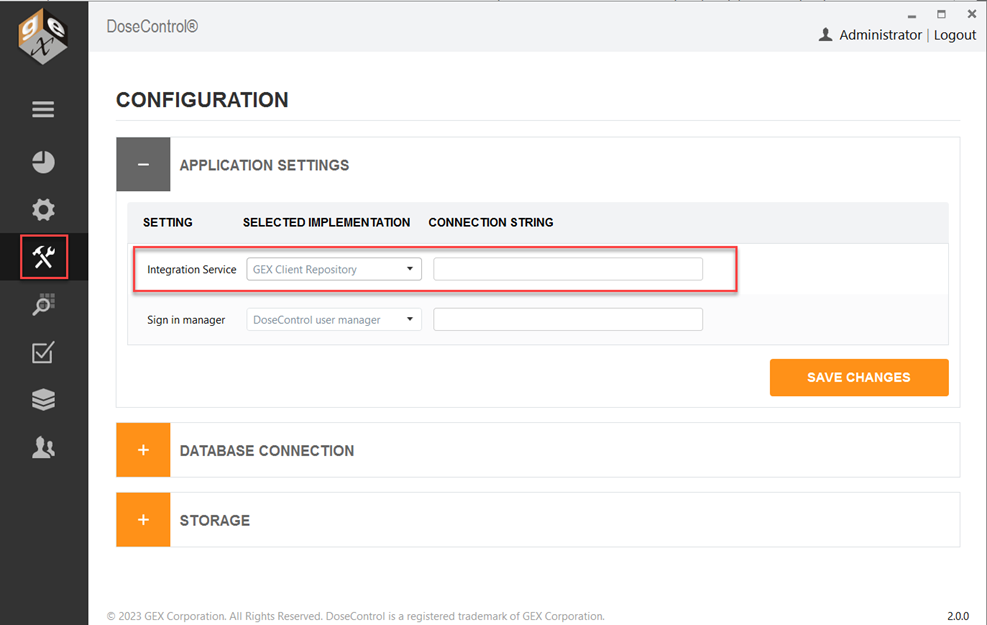
2.2.2.1 Login to DoseControl with global admin or System Admin user access. Go to the System (hammer/wrench icon) screen and expand the Application Settings.
2.2.2.2 Click the Integration Service1 dropdown and select “GEX Client Repository” option. This will activate the Import/Export tables and allow you to integrate. See Figure 1.
2.2.2.3 Do not enter a connection string in the ‘Connection String’ field unless you are instructed by GEX. Leave the field blank.
1 In versions earlier than DoseControl v 2.0.0, Integration Service is called “Client Report Service”.
2.3 DoseControl software setup
2.3.1 Use the EXTERNAL ID fields
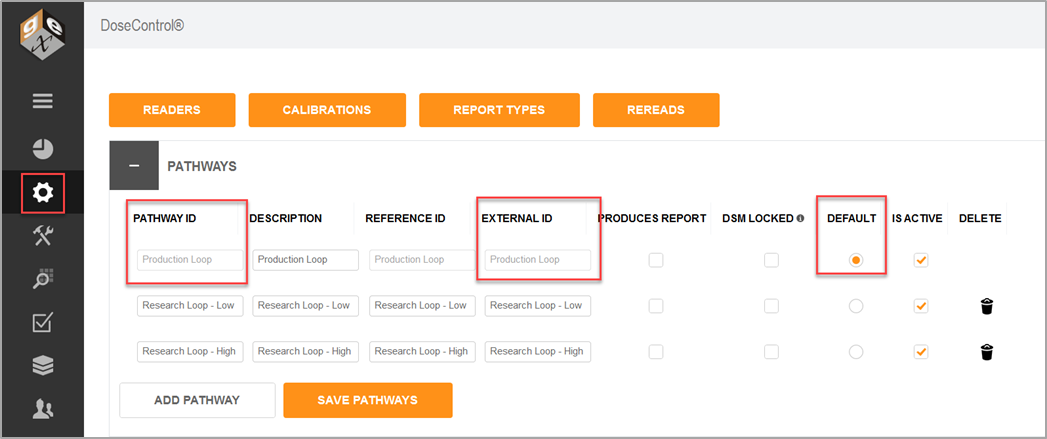
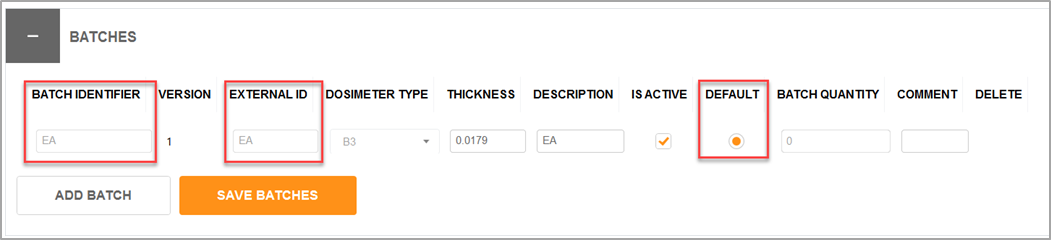
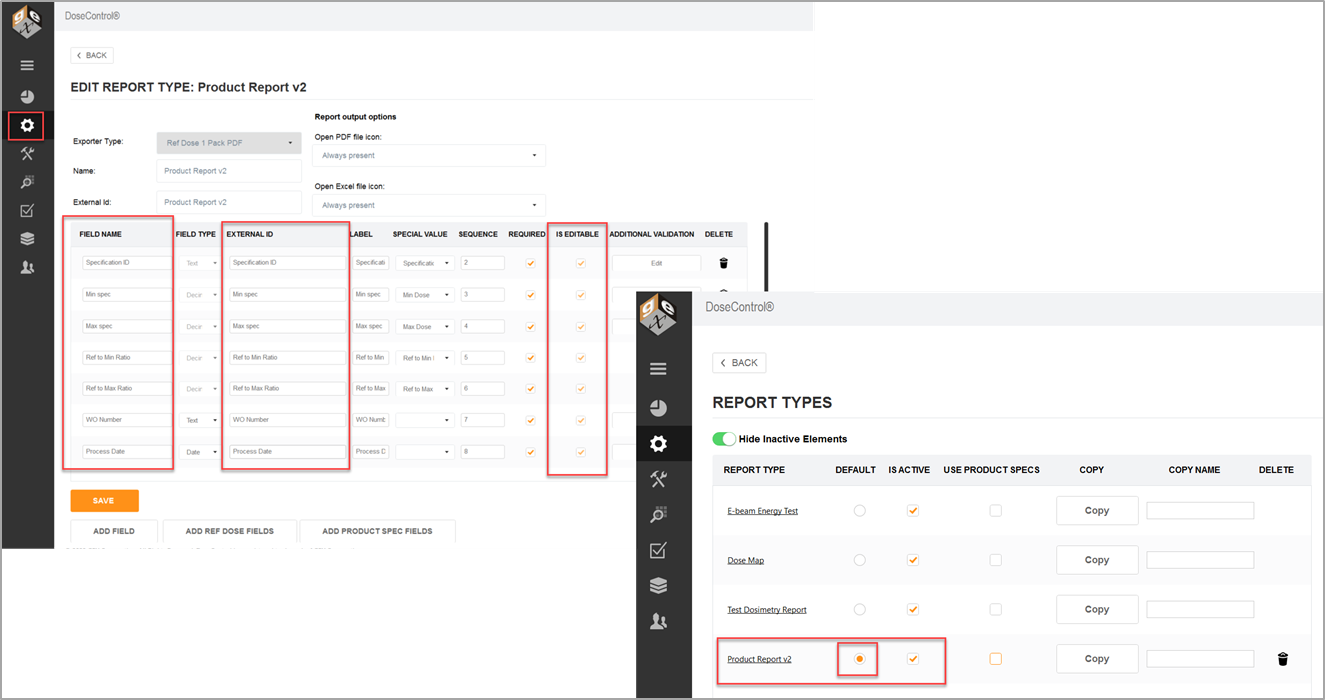
2.3.1.1 Importing reports uses the EXTERNAL ID field values in DoseControl - See Figures 2, 3 and 4 below. For details about importing reports, see Section 3.3 Import Process.
2.3.1.2 Login to DoseControl as the global admin or Application Administrator. Go to the Setup (sprocket icon) screen. Setup all areas and ensure that the item’s ID, Identifier or Name matches the EXTERNAL ID for all configurations in DoseControl software - See Figures 2 and 3.
2.3.2 Setup the Pathway, Batch and Report Type as the “default”
2.3.2.1 DoseControl uses the active “default” Pathway, Batch and Report Type for importing reports - See Figures 2, 3 and 4 below. Example: If your integration processes use Pathway=Production Loop, Batch=EA, and Report Type=Production Report v2, these items must be active and the default in the software.
2.3.3 Setup the Report Type header fields as “Is Editable”
2.3.3.1 In the Report Type configuration for each report header field, check the box titled “Is Editable”. See Figure 4.
2.3.3.2 Avoid import errors by ensuring “Is Editable” value is checked for each required report header field. See Report Types setup screenshots below. There is no supported way of removing a report from DoseControl or re-importing it - (see section 3.4.3 Import Errors).
3 DATA IMPORT
3.1 Description of Import Tables
There are three (3) tables that are used for importing data into DoseControl and they are named:
-
ImportReports
-
This table is populated with data that tells DoseControl the key information needed to select a report type and dosimeter calibration to initiate a report with imported data. It is the equivalent to the create new reports screen.
-
-
ImportReadings
-
This table will be populated with the direct dosimeter information such as ID and position.
-
-
ImportReportHeaderFieldValues
-
This table must be populated with all product and process information that is required to be on-screen within any output that DoseControl produces (PDF, etc.).
-
3.2 Design Specification - Import Tables
Table name dbo.ImportReports
|
Column Name |
Data Type |
Notes |
|---|---|---|
|
Id |
bigint |
A database-generated unique ID. |
|
CreatedDate |
datetime |
Allows to specify when the report was created. It is used for ordering reports before they are imported and is not displayed in the application. |
|
HeaderSetIdentifier |
nvarchar (110) |
Specifies the header set that the newly imported report should use. The value inserted in this column must be identical with the EXTERNAL ID field in ‘Report Headers’ configuration in DoseControl (see image below). If the value is not provided the default header set will be used. 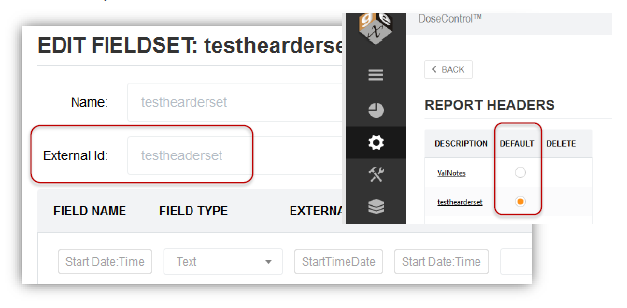
|
|
ReportIdentifier |
nvarchar(440) |
Report ID. Each Report ID must be unique in the software. This value will be used as the key identifier of the report for users to select the DoseControl home screen; must be unique – duplicates will be treated as the same report. If you have a ‘process run ID’ that is the perfect value to insert here as the ‘ReportIdentifier’. 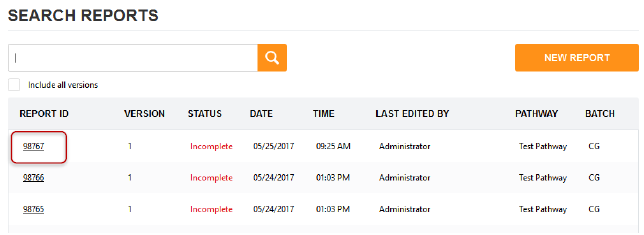
|
|
IrradiationPathwayId
|
nvarchar(440) |
Pathway ID. Specifies the irradiation pathway the imported report should use. The value inserted in this column must be identical with the EXTERNAL ID field in ‘Pathways’ configuration in DoseControl (see image below). If no value is provided the default pathway will be used; use a static value in scripts to populate this column if the value is not part of your run data set. 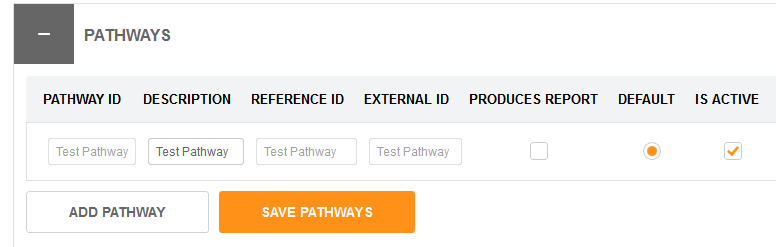
|
|
BatchIdentifier |
nvarchar(440) |
Specifies the batch the imported report should use. The value inserted in this column must be identical with the EXTERNAL ID field in ‘Batches’ configuration in DoseControl (see image below). If no value is provided the default batch will be used; use a static value in scripts to populate this column if the value is not part of your run data set. 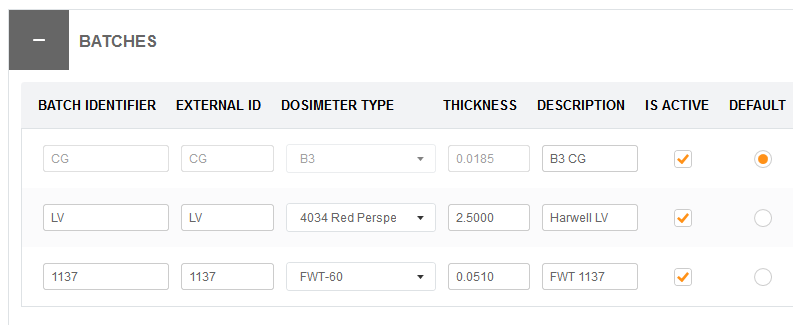
|
Table name dbo.ImportReadings
|
Column Name |
Data Type |
Notes |
|---|---|---|
|
Id |
bigint |
Database-generated unique ID. |
|
ImportReportId |
bigint |
The ID column value from the ImportReport table to which the reading belongs. |
|
DosimeterIdentifier |
nvarchar(max) |
Unique Dosimeter ID. Value to identify the dosimeter packet (packet may contain more than one dosimeter); needs to be unique; can be a barcode value or any value used to uniquely identify each dosimeter processed through the irradiation system. |
|
Position |
nvarchar(max) |
Position identifier; optional; identifies the position of the dosimeter in the ‘tote’ identified in ‘ToteIdentifier’ below. |
|
ToteIdentifier |
nvarchar(max) |
Tote identifier; optional; may be a carrier, tray, etc., or it may be an identifier of a unique fixture used as the routine monitoring position. |
|
Sequence |
int |
Value is used in determining the order of the readings inside of the report; optional; if no value is provided the database order will be used to sequence the DosimeterIdentifiers within DoseControl . |
Table name dbo.ImportReportHeaderFieldValues
|
Column Name |
Data Type |
Notes |
|---|---|---|
|
Id |
bigint |
Database-generated unique ID. |
|
ImportReportId |
bigint |
The ID column value from the ImportReport table to which the header field belongs. |
|
FieldIdentifier |
nvarchar(200) |
A name used for identification of the field and is not the value from the run data. The value inserted in this column must be identical with the EXTERNAL ID field in the Header Set configured in ‘Report Headers’ and must match the report’s HeaderSetIdentifier in the ImportReports table. In case no matching field is found, the field will be skipped, and no error will be returned. 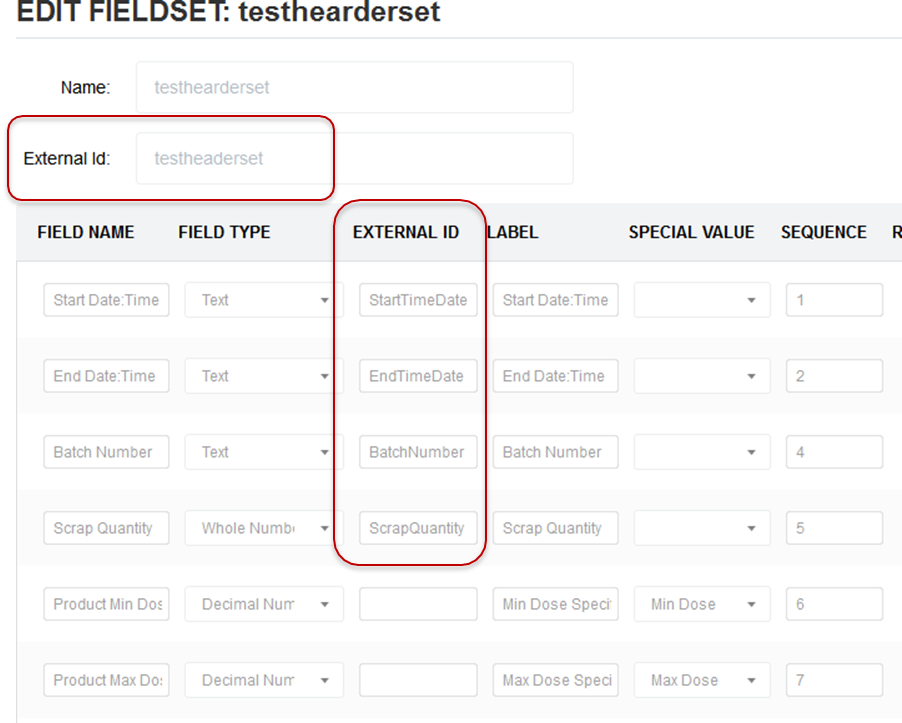
|
|
Value |
nvarchar(max) |
The value assigned to a given field upon import. For example, if the Field Name is ‘Product Description’ then the value would be the actual description (e.g., “5mL Syringe 100pk”). |
3.3 Import Process
Import tables serve as a queue for the reports to be imported from the application. Once a report is imported from the application it cannot be
3.3.1 Ensure DoseControl is ready
3.3.1.1 See Section 2.2 Turn on integration feature in DoseControl, and Section 2.3 Setup DoseControl software.
3.3.2 Use a Single Transaction per Report
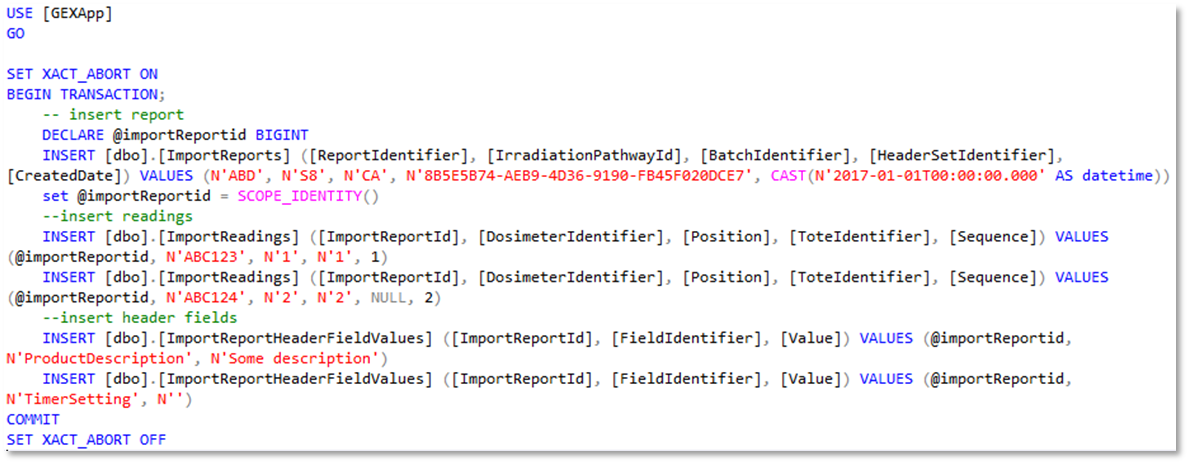
Each Report contains information from each of the three 3 Import tables (ImportReport, ImportReadings, ImportReportHeaderFieldValues) listed in section 3.2. GEX strongly suggests that you use one transaction to fill all three Import tables for each Report.
If you do not use a single transaction for each Report, a partial report import could occur causing errors. See section 3.4 Import Errors.
See Figure 5 below for an example of the code used for a single transaction.
IMPORTANT! – Your code will be different than the example below based on INSERT statements needed for your specific data sets.
3.3.3 The Report appears in the reports lists on the main screen
3.3.3.1 The DoseControl home screen lists the reports to be imported with a status=New. Until the report is imported, its status will be displayed as 'New' and no additional information (Date, Time, Edited By, Pathway, Batch) will be available. See Figure 6.
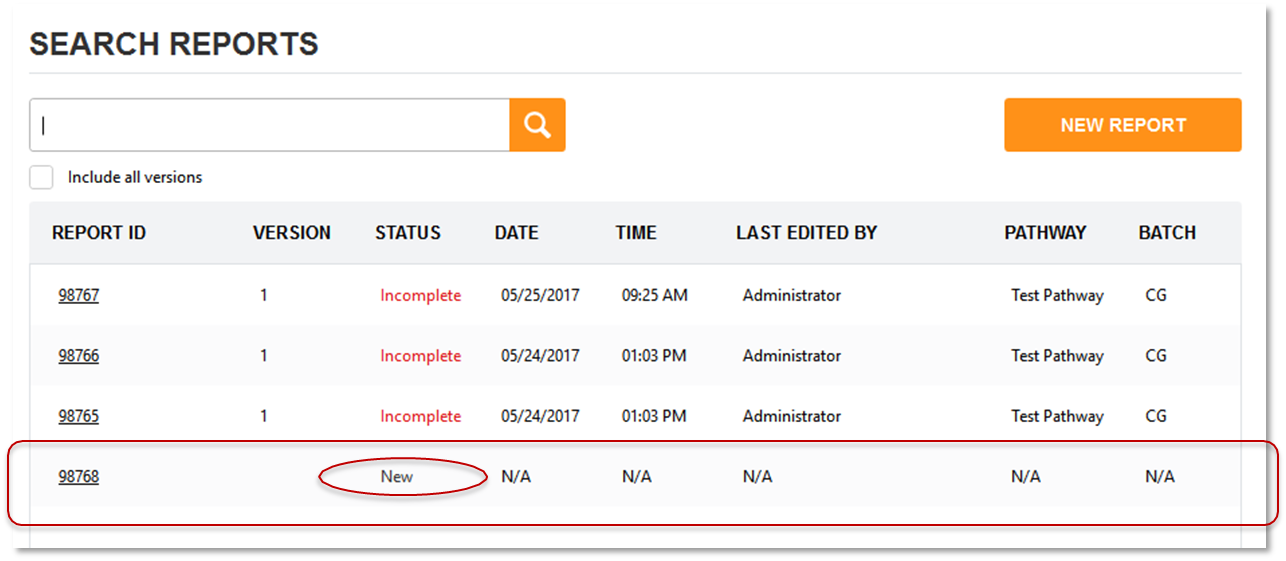
3.3.3.2 The user must click the Report ID to import this report, and this action brings the Report information from the Import tables to the main application database. Once imported, the report will change its status to ‘Incomplete’. The Date and Time display when the report import occurred, Last Edited by is the user that imported the report, and the Pathway and Batch are associated with the report. See Figure 7.

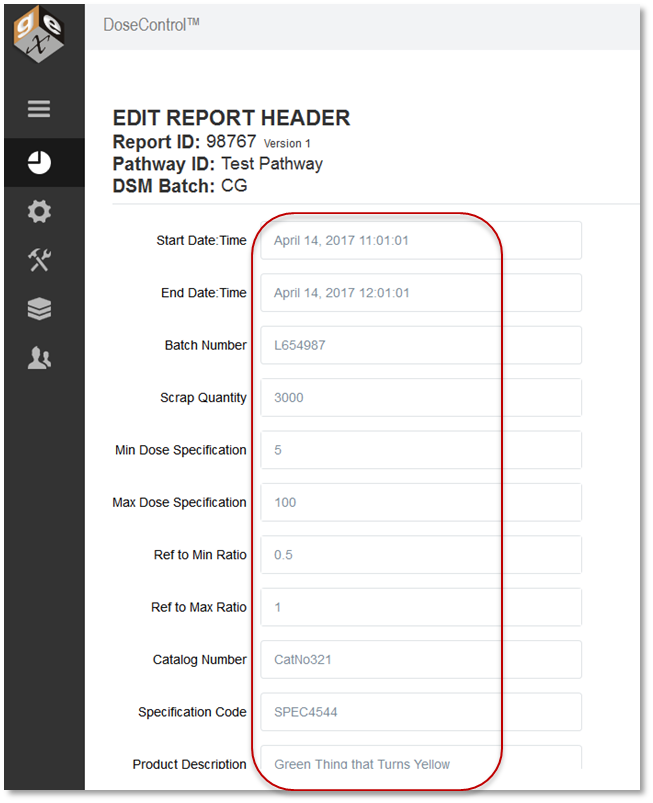
3.3.3.3 The user can click the Report ID to open the report. The software will display all the report header fields (the header fields where the value was provided in the import table will be filled in, while any other header fields will remain empty). See Figure 8.
3.3.4 Managing the Import Table Data
You must manage the data in the import tables.
The records in the Import tables are not managed by DoseControl (or GEX) in any way. Once a report has been imported into DoseControl, its original records remain in the import tables but can be safely removed. The import table records will not be referenced or used in any way after they are imported into DoseControl.
3.4 Import Errors
3.4.1 Duplicate Dosimeter IDs
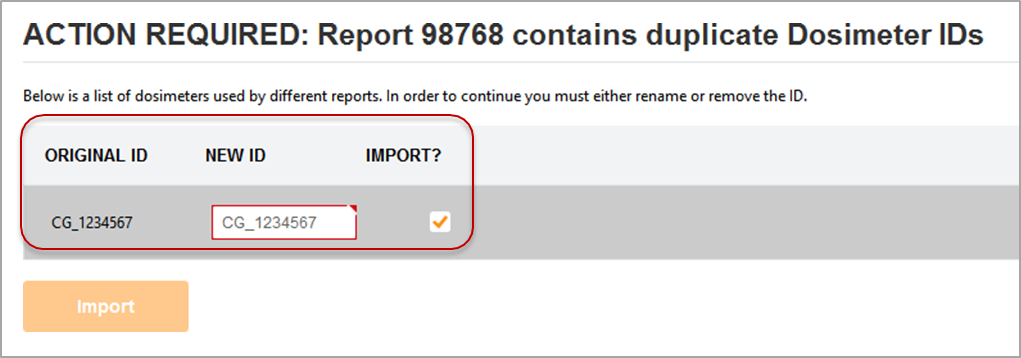
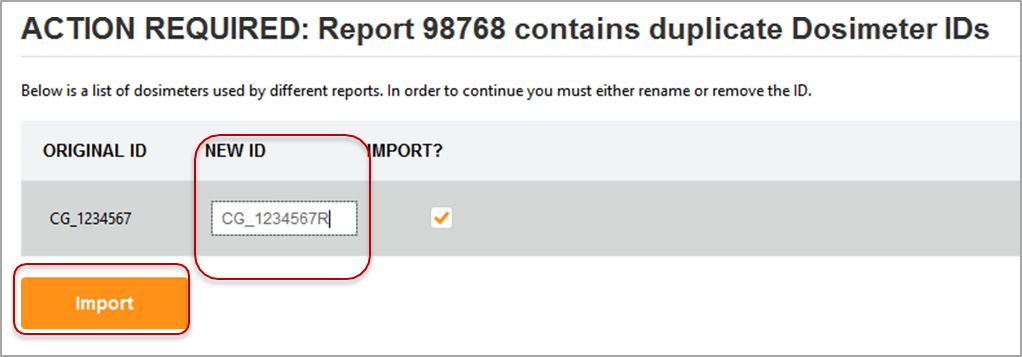
DoseControl requires Dosimeter IDs to be globally unique in the system. DoseControl software will not allow duplicate dosimeter IDs. If a user attempts to import (open) a newly imported report that contains duplicate dosimeter IDs, the user will be required to change the Dosimeter ID within the application using the screen below before proceeding - see Figures 9 and 10.
3.4.2 Wrong Batch/Pathway/Headerset
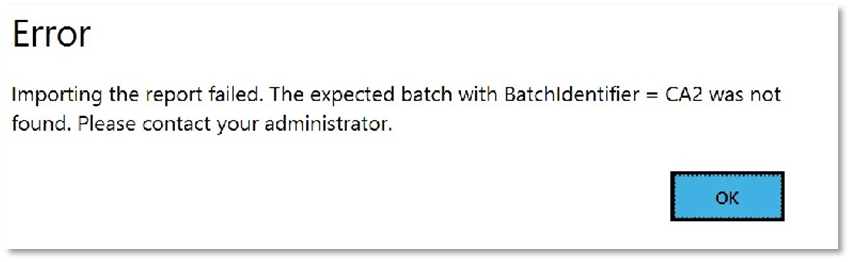
If a Batch, Pathway, or the Report Type (report header set) specified to DoseControl in the ImportReports table does not exist in the software dosimetry configuration, or is inactive in the software, or is not the “default” in the software, an error message will be displayed. See Figure 11.
This error can also occur if the application has not been configured yet by the administrator. See Section 3.3.1 Ensure DoseControl is Ready.
3.4.3 Imported Report Missing Necessary Values
If you make a report header field “Required” you also should make this field “Editable”. In the Report Types configuration, for each report header field, click the box titled “Is Editable”. Ensure this value is checked to allow the routine user to edit the imported values or fill them the report fields if they are imported as empty.

IMPORTANT! There is no supported way of removing a report from DoseControl or re-importing it. If you do not allow fields to be editable, a report experiencing this problem will not ever be allowed to be processed and will become an eternally incomplete record. We suggest creating another report with the same Report ID suffixed with a sequence number, and then manually import or send the data again on import with the suffixed ID.
3.4.4 Date Time values must be in valid regional format
Imported report header field date and time values must be in a valid format for the importing system (the importing PC’s regional settings).
For example, if these values are created on an English-US computer (10/26/2017 1:14:29 PM for example) and then imported on a computer that formats dates and times differently, say English-Austria that uses DD/MM/YYYY, then the import will fail.
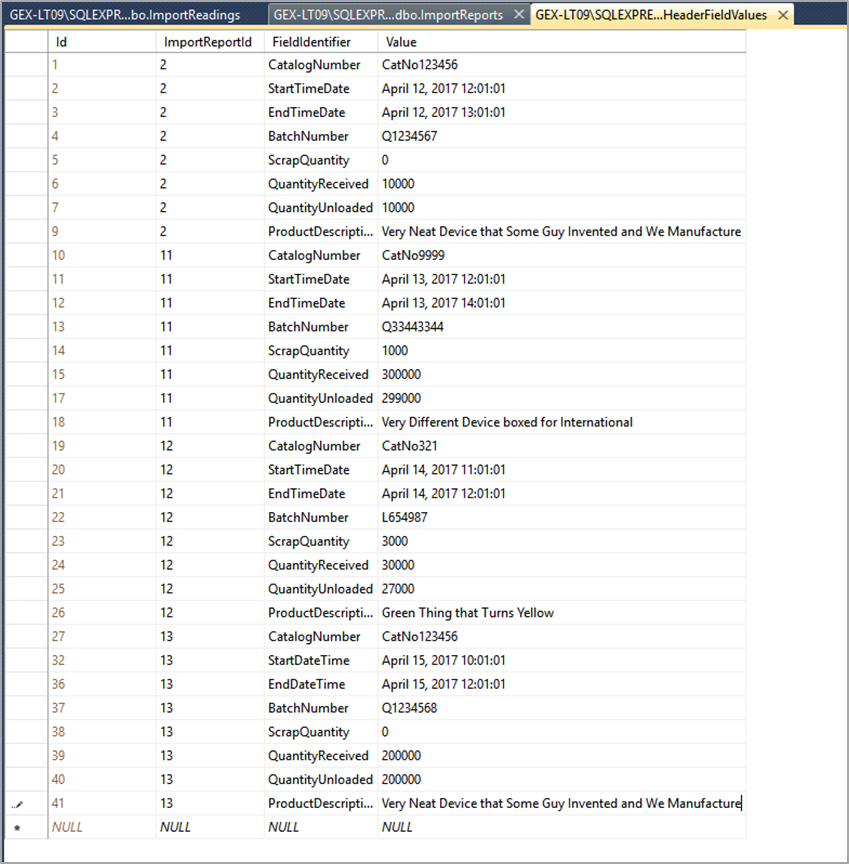
3.5 Practical Example - Import
Below are examples of data in the import tables:
Table name dbo.ImportReports
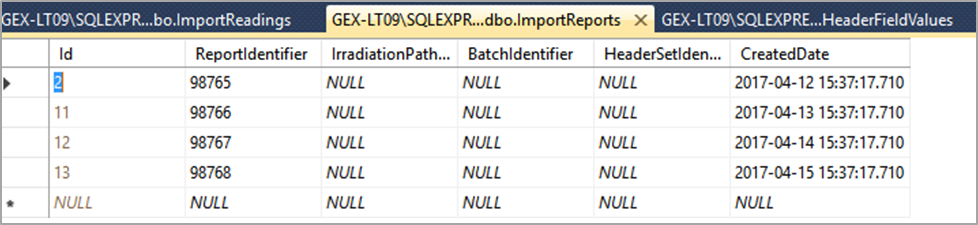
Table name dbo.ImportReadings
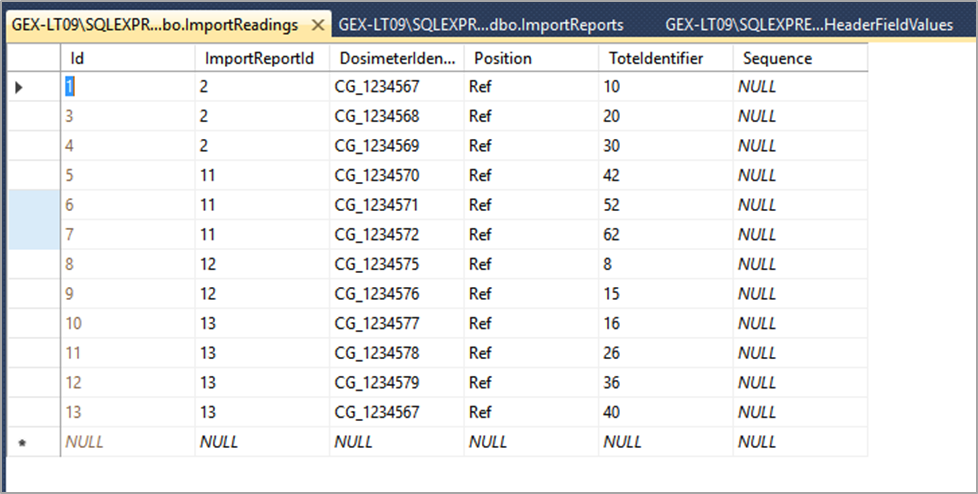
Table name dbo.ImportHeaderFieldValues
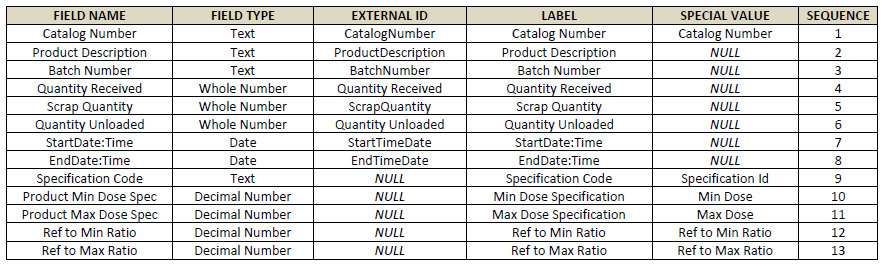
Below is an example of the Report Type configuration and Product Specification configuration for the import data, as structured in the table above:
3.6 Helpful Reminders
Match the EXTERNAL ID value with the appropriate Import table column name:
-
‘HeaderSetIdentifier’ value inserted in this column must be identical with the EXTERNAL ID field in ‘Report Type’ configuration in DoseControl.
-
‘FieldIdentifier’ value inserted in this column must be identical with the EXTERNAL ID field in the report header fields configured in ‘Report Type’ and must match the report’s HeaderSetIdentifier in the ImportReports table. In case no matching field is found, the field will be skipped, and no error will be returned.
-
‘PathwayId’ Value inserted in this column must be identical with the EXTERNAL ID field in ‘Pathways’ configuration in DoseControl.
-
‘BatchIdentifier’ value inserted in this column must be identical with the EXTERNAL ID field in ‘Batches’ configuration in DoseControl.
-
All report header fields except ‘CatalogNumber’ that are imported into a report from the Product Specification Module do not require an EXTERNAL ID in header configuration.
Report Type setup:
-
If you have a custom PDF report (provided by GEX), the Report Type’s header ‘Field Name’ must be exact. GEX will give you the Field Names for the Report Type configuration.
-
For the Report Type setup, you may use any text in the ‘Label’ column. The ‘Label’ is the on-screen displayed report fields and are modifiable before the report header is first used. Make sure you like the ‘Label’ name before importing reports.
-
About report header field sequence – In the report type setup in section 3.5, the report header fields are listed in a sequence that was preferred by the customer. You may change the sequence of the report header fields before importing reports.
-
Mark report header fields ‘Required’ if the data is required for that field before the user is allowed to ‘Process Report’ (i.e., export).
-
If you are using a Report Type setup with Product Specifications fields, follow the guidelines in the DoseControl User Guide (GEX Doc. 100-266).
IMPORTANT! Ensure any report header field marked ‘Required’ is also marked ‘Is Editable’ for all fields. See section 3.4.3 Import Errors.
4 DATA EXPORT
4.1 Description of Export Tables
4.1.1 On ‘Process a Report’: Exporting a Complete Report all dosimeter measurement information in the report
When the user presses the ‘Process Report’ button, the report’s data is stored in four (4) tables, ExportReports, ExportComments, ExportDosimeters, ExportHeaderValues. These tables are separate from the master records in the application database.
-
ExportReports: DoseControl exports top level report information into this table such as the irradiation pathway and batch along with the key identifier, the Report ID, and its version number. The same Report ID can occur multiple times in this table but will be identifiable by the version number.
-
ExportComments: DoseControl exports comments from reports into this table. Since the software has a versioning system for reports, different comments may be propagated into this table at different times depending on when a different version of a report is processed.
-
ExportDosimeters: This table contains all the dosimetry details: absorbance, dose, thickness, and response of the dosimeter to the username that measured it, and the instrument serial number used for measurements.
-
ExportHeaderValues: This table contains header field values that are associated with the report. Whatever fields are configured in the header will be posted here for retrieval. This includes header field whose values originate in the software and those that were imported into the software.
4.1.2 On ‘Measure a dosimeter’: Exporting single dosimeter measurement information
When the user presses the ‘Measure’ button on the measurement screen, the ExportMReadings table stores single measurement event values and the associated dosimetry information for that measurement event (Calibration, Batch, Reader, etc.) for a Dosimeter ID. This table is separate from the master records in the application database.
4.2 Design Specification - Export Tables
Table name dbo.ExportReports
|
Column Name |
Data Type |
Notes |
|---|---|---|
|
Id |
bigint |
Database-generated unique ID. |
|
DosimetryReportId |
nvarchar(440) |
Report ID. This is identical to the ‘ReportIdentifier’ field that is explained in the imports section. |
|
Version |
int |
Version of the report; the DosimeterReportId and Version pair is unique. 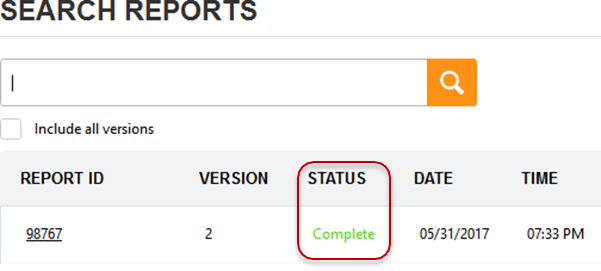
|
|
MeasurementInstrumentSn |
nvarchar(440) |
Spectrophotometer or Reader's serial number 
|
|
MeasurementInstrumentId |
nvarchar(440) |
Spectrophotometer or Reader's Spectrophotometer unique ID 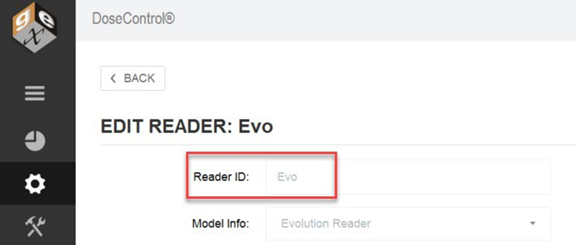
|
|
MeasurementInstrumentWorkstationId |
nvarchar(max) |
Name of the PC to which the reader was assigned. |
|
MeasurementInstrumentCalibrationDate |
datetime |
Spectrophotometer or Reader's last calibration date. |
|
ReportCompleteDateTime |
datetime |
UTC formatted timestamp when the report was processed. |
|
ReportUserName |
nvarchar(max) |
Display name of the user processing the report. 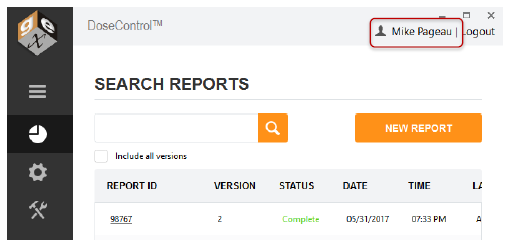
|
|
ReportUserId |
nvarchar(max) |
Username of the user logged into the PC that is processing the report. |
|
DosimeterType |
nvarchar(max) |
The trade name or similar of the dosimeter used in the report. 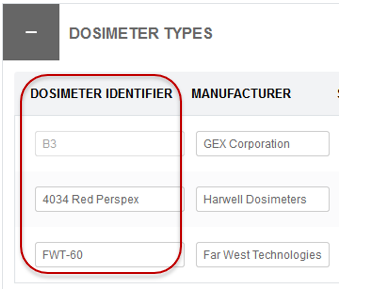
|
|
DosimeterBatchId |
nvarchar(max) |
Batch Identifier is the dosimeter batch ID. 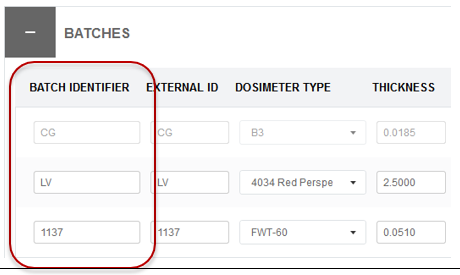
|
|
NumberOfDosimeterReplicates |
int |
‘Absorbance count’ of the calibration used in the report. This is how many dosimeters are used for each Dosimeter ID (e.g., 1 per pouch, 2 per pouch). 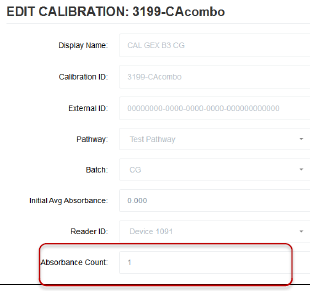
|
|
BatchCalibrationDate
|
datetime |
Calibration's Start Date: 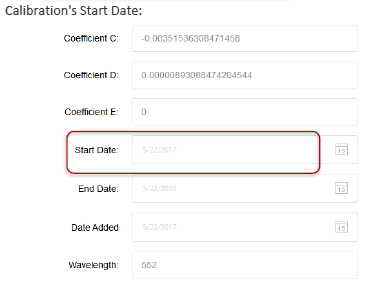
|
|
CalibrationResponseFunctionId |
nvarchar(max) |
Calibration Identifier: 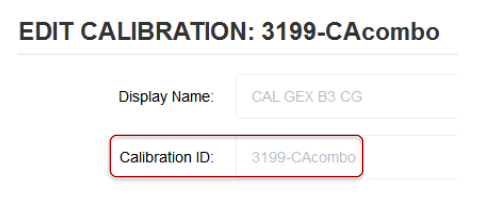
|
|
CalculatedRunMinimumDose
|
float |
CalculatedRunMinimumDose is the report’s overall Minimum adjusted dose (in kGy) of all measured dosimeters contained in the report. Adjusted dose = Dose * Ref:Min Ratio |
|
CalculatedRunMaximumDose |
float |
CalculatedRunMaximumDose is the report’s overall Maximum adjusted dose (in kGy) of all measured dosimeters contained in the report. Adjusted dose = Dose * Ref:Max Ratio |
|
PathwayId |
int |
The database’s unique identifier for the irradiation ‘Pathway’. |
|
IrradiationPathwayId |
Nvarchar(440) |
The name of the ‘Pathway’, or Pathway ID for the Pathway configured. 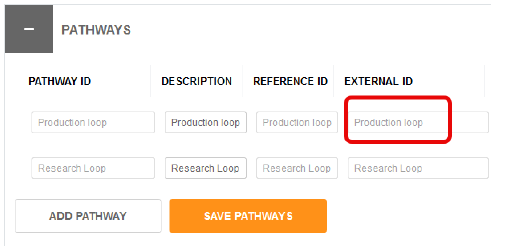
|
Table name dbo.ExportComments
|
Column Name |
Data Type |
Notes |
|---|---|---|
|
Id |
bigint |
Database-generated unique ID. |
|
Comment |
nvarchar(max) |
Content of the comment from a particular version; includes both posted comments and skipped dosimeter information, if any. 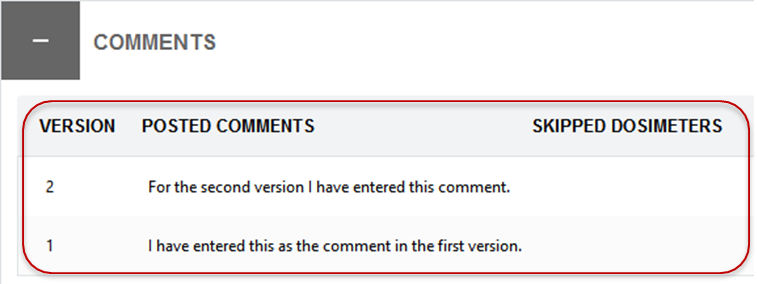
|
|
ReportVersion |
int |
Version of the Report ID the comment belongs to. |
|
ExportReportId |
bigint |
Id column value of the ExportReport the comment belongs to. |
Table name dbo.ExportDosimeters
|
Column Name |
Data Type |
Notes |
|---|---|---|
|
Id |
bigint |
Database-generated unique ID. |
|
Identifier |
nvarchar(max) |
Dosimeter ID number: 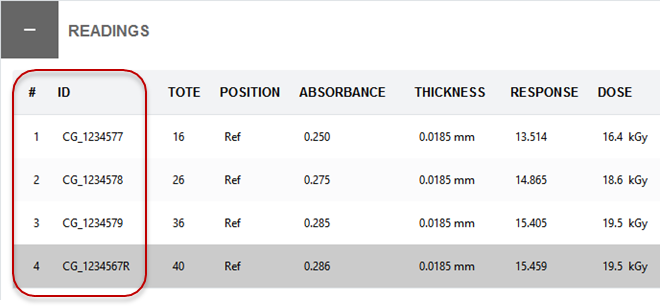
|
|
Position |
nvarchar(max) |
Dosimeter position information: 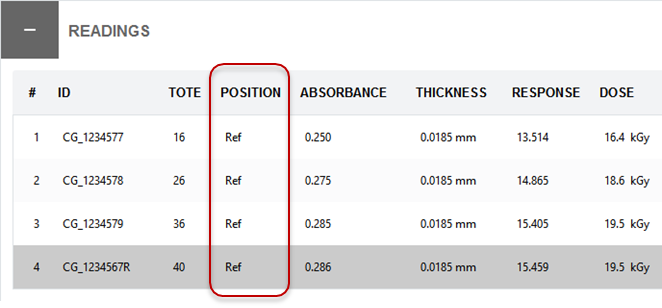
|
|
Tote |
nvarchar(max) |
Tote ID: 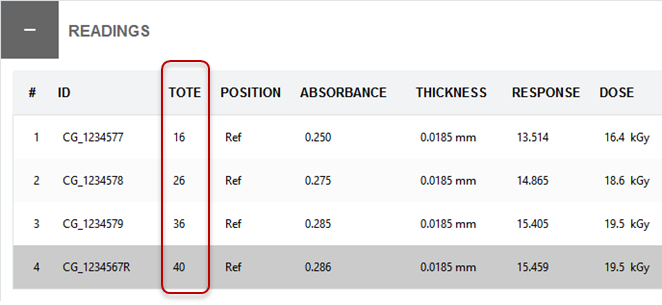
|
|
AbsorbanceValue |
float |
Average absorbance used for calculation the dose; can be ‘null’ for readings computed by statistical re-reads (not shown in image below): 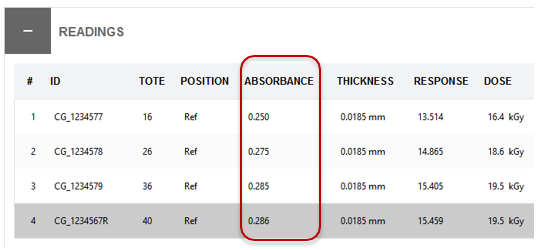
|
|
Thickness |
float |
Average thickness of all absorbances. Depending on the configuration it can reflect manually entered thickness, measured thickness (if micrometer is configured), or the thickness value specified for the batch: 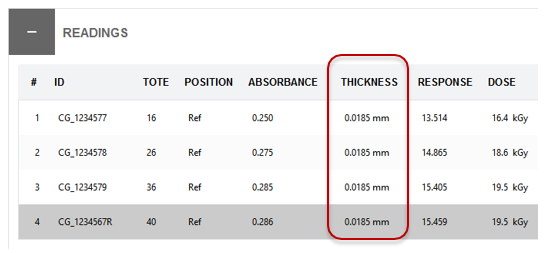
|
|
Background |
float |
Initial Average Absorbance of the calibration: 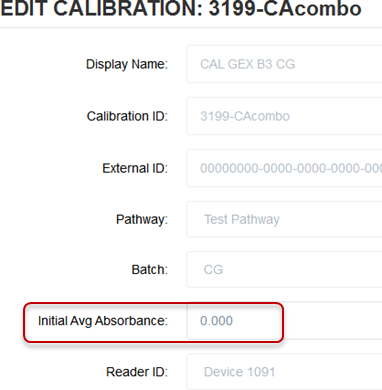
|
|
TotalNumberOfMeasurements |
int |
Total number of absorbance measurements for the Dosimeter. For example, if the dosimeter is measured once, value=’1’. If the dosimeter is reread one time, value=’2’, etc. |
|
FinalDose |
float |
Adjusted dose for the dosimeter ID that is the final value after any rereads, according to user configured reread policy. 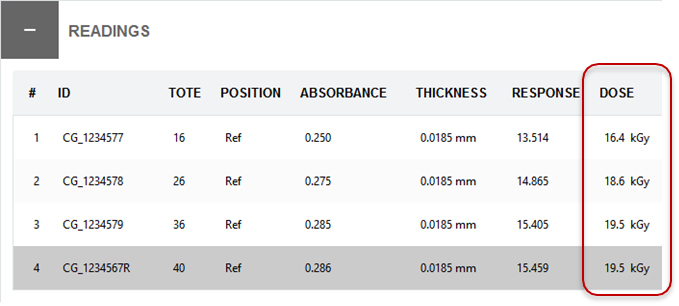
|
|
ExportReportId |
bigint |
ID column value of the ExportReport the dosimeter belongs to. |
|
DoseIsUnderRange |
bit (not null) |
Boolean value. True = reading is under the range of the calibration specified in the Calibration configuration. Otherwise, false. 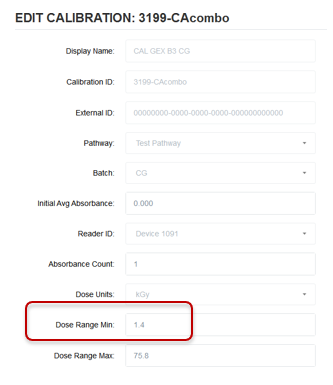
|
|
DoseIsOverRange |
bit (not null) |
Boolean value. True = reading is over the range of the calibration specified in the Calibration configuration. Otherwise, false 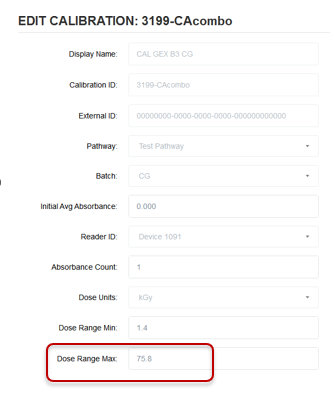
|
Table name dbo.ExportHeaderValues
|
Column Name |
Data Type |
Notes |
|---|---|---|
|
Id |
bigint |
Database-generated unique ID. |
|
ExportReportId |
bigint |
ID column value of the ExportReport the dosimeter belongs to. |
|
ExternalIdentifier |
nvarchar(max) |
EXTERNAL ID of the header field. This value is used during the import process to match imported fields with their appropriate field in configured report headers. Depending on configuration this value can be ‘null’: 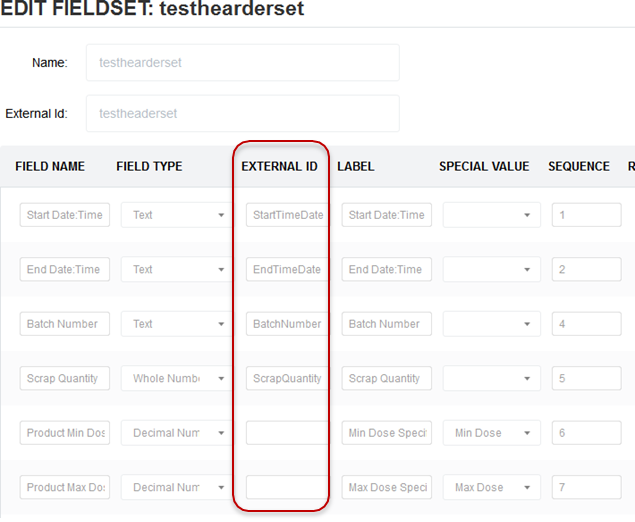
|
|
FieldName |
nvarchar(max) |
Name of the field. Value will always be provided: 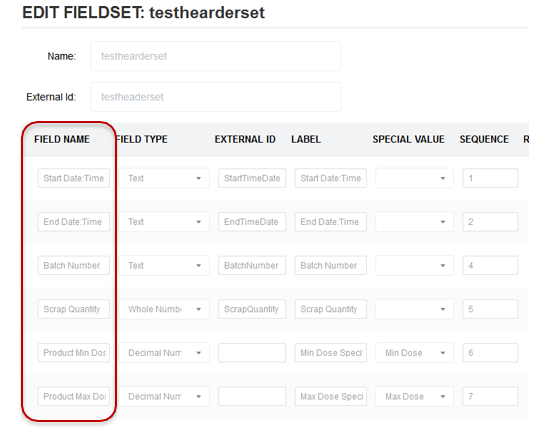
|
|
Value |
nvarchar(max) |
The value of the header field 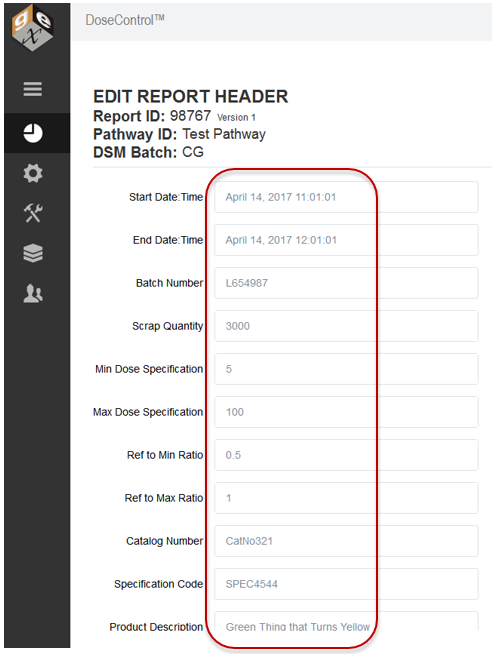
|
Table name dbo.ExportMReadings
|
Column Name |
Data Type |
Notes |
|---|---|---|
|
Id |
bigint |
Database-generated unique ID. |
|
DSM_SN |
nvarchar(max) |
The unique number of the dosimeter. DoseControl cannot output two identical numbers unless all the configuration fields match. Specifically, there cannot be a duplicate ID from a different irradiation pathway, dosimeter batch, or measurement instrument. There should not be a need for the end-user to screen for duplicates ever existing in this field. |
|
CDose |
float |
CDose is the “adjusted dose”. See Definitions. CDose=MDose*Correction Factor. 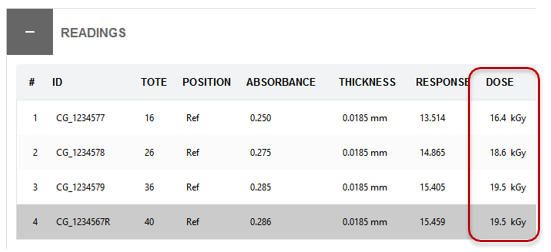
|
|
Rev |
Int (not null) |
Rev is an Integer value indicating the dosimeter’s reading version . The dosimeter’s (DSM_SN) Rev value increases anytime that a measurement event, reread event, or skip measurement event occurs. |
|
Valid |
Bit (not null) |
Boolean value. True = reading is within the range of the calibration specified in the Calibration configuration. False = reading is outside the Calibration dose range. |
|
User |
nvarchar(max) |
The username of the user from application login. Varies depending on the login method configured and the individual user typology used. |
|
Name |
nvarchar(max) |
The full name of the user from application login. Varies depending on the login method configured and the individual user typology used but is designed for the user’s first and last name. |
|
Comment |
nvarchar(max) |
When a user skips a reading in the application a comment is required for that event. That comment will appear here, if applicable. |
|
Tote |
nvarchar(max) |
From the field by same name in user interface of measure screen. The user can enter a Tote number, or you can use this field for another purpose. 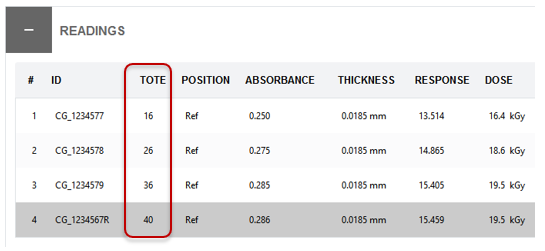
|
|
Pos |
nvarchar(max) |
From the field by same name in user interface of measure screen. The user can enter a Position number, or you can use this field for another purpose. 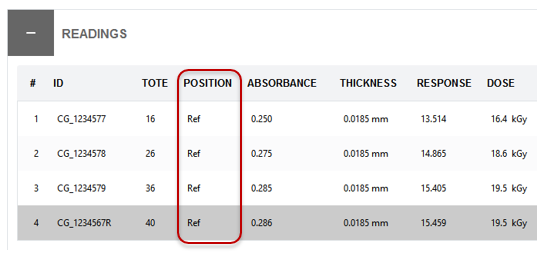
|
|
Ao |
float |
Original Absorbance (background absorbance) value of the dosimeter. The Ao is the “Initial Average Absorbance” value as configured in the Calibration used to determine dose for that dosimeter. May be NULL if not configured in the calibration. 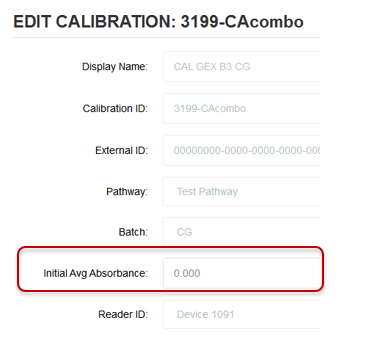
|
|
AiA |
float |
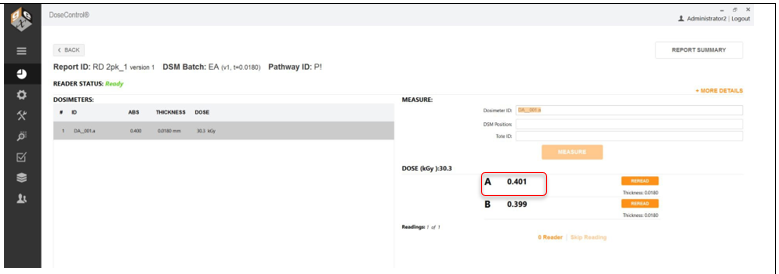
Absorbance values for dosimeter replicate A from the measure screen for that dosimeter ID. If the Calibration used is configured with a 1, 2, 3 or 4 for “Absorbance Count”, the AiA value is the dosimeter absorbance measurement (the A measurement – the first and only dosimeter absorbance measurement). 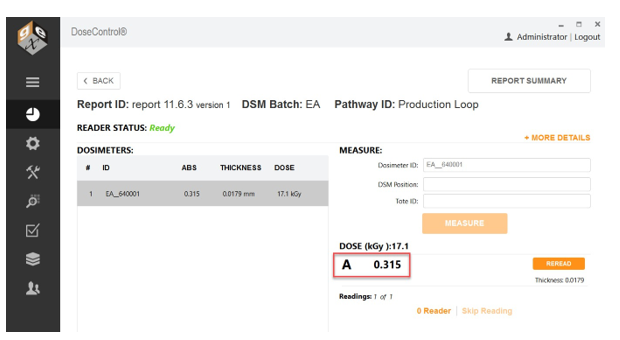
|
|
AiB |
float |
Absorbance values for dosimeter replicate B from the measure screen for that dosimeter ID, if any. If the Calibration used is configured with a value of 2, 3 or 4 for “Absorbance Count”, the AiB value is the B dosimeter absorbance measurement (the B measurement – the second absorbance measurement in a series). 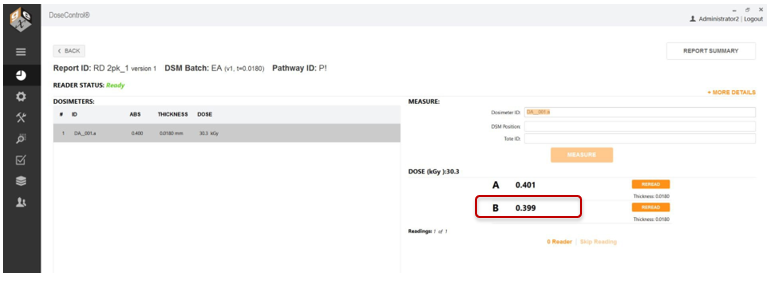
|
|
AiC |
float |
Absorbance values for dosimeter replicate C from the measure screen for that dosimeter ID, if any. If the Calibration used is configured with a value of 3 or 4 for “Absorbance Count”, the AiC value is the C dosimeter absorbance measurement (the C measurement – the third absorbance measurement in a series). |
|
AiD |
float |
Absorbance values for dosimeter replicate D from the measure screen for that dosimeter ID, if any. If the Calibration used is configured with a value of 4 for “Absorbance Count”, the AiD value is the D dosimeter absorbance measurement (the D measurement – the fourth absorbance measurement in a series). |
|
Tvalue |
float |
Dosimeter thickness from the dosimeter batch that is used to determine dose for that dosimeter. Dosimeter batch thickness is configured in Batches in the application. 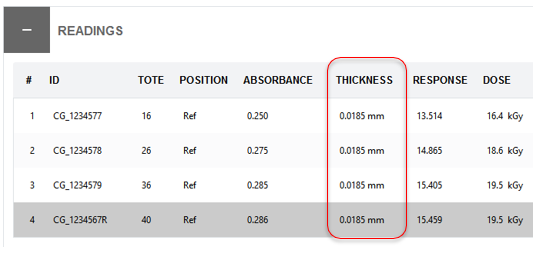
|
|
Resp |
float |
The calculated Response value for the dosimeter (Ai – Ao / T) where Ai is the average absorbance of dosimeter replicates A through D. (The Response is used to calculate MDose, (i.e., Dose) 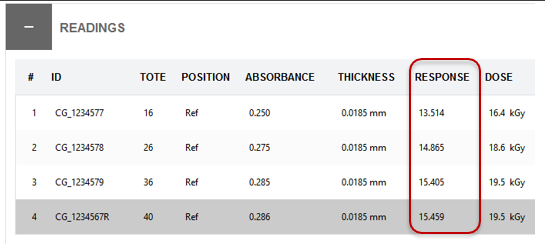
|
|
C_F |
float
|
Correction Factor. Correction Factor may be part of the Calibration configuration and is used to make a linear correction of the dose. See Definitions |
|
MDose |
float |
MDose is “Dose”. Dose calculated from the Average Dosimeter Response. MDose is not visible on the screen. |
|
Inst_SN |
nvarchar(max) |
The serial number of instrument (spectrophotometer or reader) used to acquire the absorbance readings for the dosimeter. |
|
Inst_WL |
int |
The wavelength of measurement used to acquire the absorbance readings for the dosimeter. |
|
Path |
nvarchar(max) |
The Pathway ID from application that the dosimeters were irradiated in. The pathway ID is configured in Pathways. |
|
DSMbatch |
nvarchar(max) |
The dosimeter batch ID from the calibration configuration in the application. |
|
DSMCal |
nvarchar(max) |
Calibration ID. The unique name of the Calibration stored in DoseControl used to calculate the doses for the specific dosimeter ID. |
|
CreatedDate |
Datetimeoffset( 7) |
Date and time of measurement event (measure, reread). UTC formatted timestamp. |
|
IsStatisticalReread |
Bit, null |
Boolean value. True = the Absorbance value (AiA, AiB AiC or AiD) is a valid statistical reread absorbance value. False = the Absorbance value (AiA, AiB AiC or AiD) is the absorbance value for dosimeter replicate from the measure screen for that dosimeter ID. See “AiA, AiB AiC or AiD” above. |
|
IsDoseUnderRange |
Bit, not null |
Boolean value. True = reading is under the range of the calibration specified in the Calibration configuration. Otherwise, false. |
|
IsDoseOverRange |
Bit, not null |
Boolean value. True = reading is over the range of the calibration specified in the Calibration configuration. Otherwise, false. |
4.3 Export Process
When reading from the export tables for integration purposes make sure that the SELECT queries specify the names of the columns instead of using the 'star' (SELECT *) shorthand. This will prevent breaking changes to your integration scripts in the event GEX adds new columns to the export tables in future versions of DoseControl software.
4.3.1 Managing the Export Table Data
The records in the Export tables are not managed in any way by DoseControl. DoseControl will push data to the export tables, and you must maintain the export tables and delete old data.
4.3.2 Export process for ExportReports, ExportDosimeters, ExportHeaderValues, ExportComments
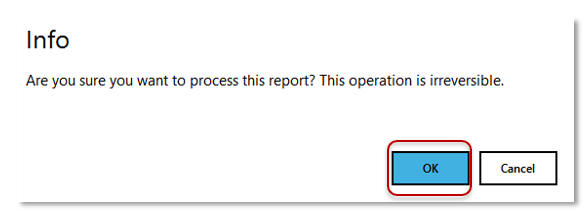
The export process is triggered when the user clicks the ‘Process Report’ button on the Report Summary screen. Report processing is confirmed by the user by clicking the “OK” button on the info message. (See Figures 16 and 17 below.)
A report can be processed anytime and may include missing (NULL) dosimeter readings. However, a report with no dosimeter readings cannot be processed. If the export fails, then the report processing will not complete. In the event of an export failure, contact GEX for assistance.
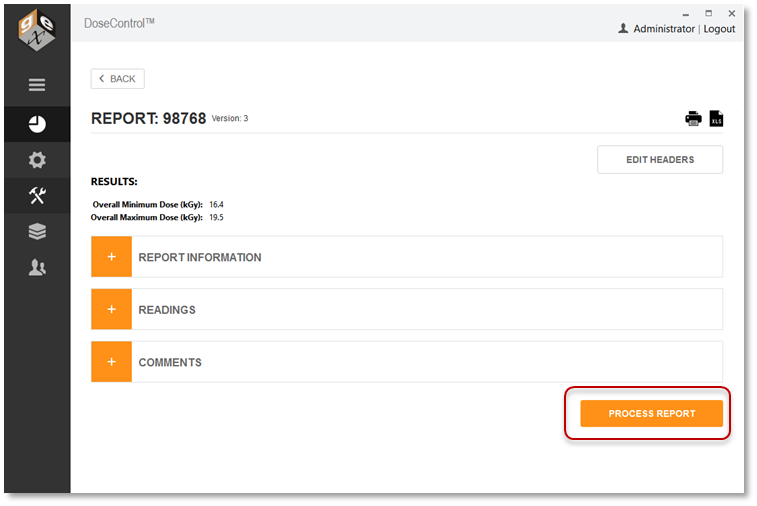
|
|
4.3.3 Export process for ExportMReadings
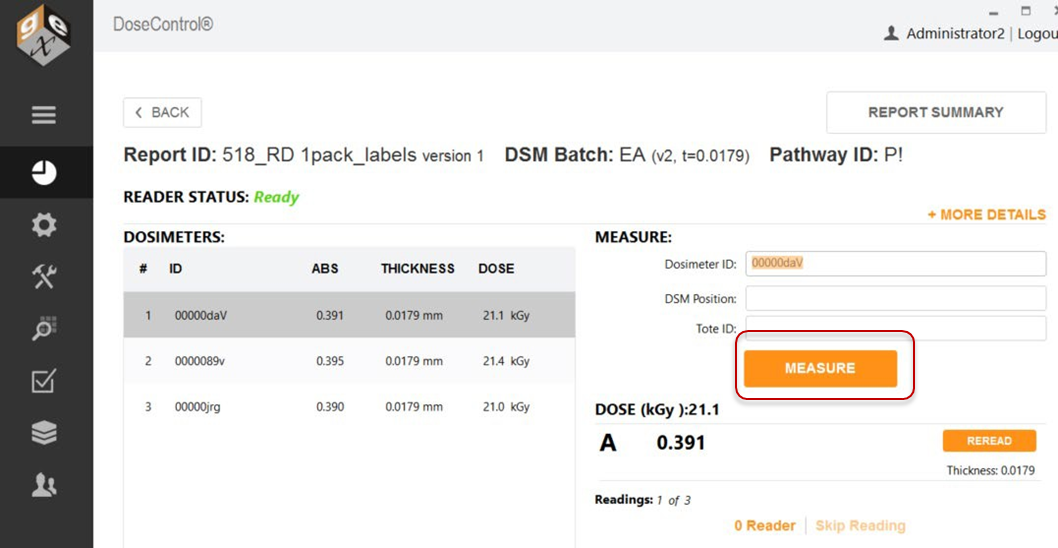
Each time the ‘Measure’ button is pressed on the Measure screen, the data for that dosimeter is exported to the dbo.ExportMReadings table. See Figure 18.
Disclaimer -The information contained in this document is provided “as is” and is not a substitute for the user’s professional judgement. It is provided as a convenience to those using products provided by GEX Corporation who have sufficient technical skills to evaluate and properly apply the information in this document. It is the responsibility of the user of this document to ensure that the information in this document, and the use of such information, is accurate, complete, applicable to the product, suitable for the user’s purposes, and in compliance with all laws and regulations. GEX Corporation believes the information provided in this document is accurate and reliable as of the time of writing, but it undertakes no obligation to update or correct this document. GEX Corporation may, but is not required to, make changes to this document at any time without notice. By using the information in this document, the user represents and warrants that he or she has the skills necessary to properly understand and apply this information and that he or she will comply with all applicable laws and regulations including, without limitation, those relating to medical devices, pharmaceutical products, or other applicable industries. The user assumes all risks associated with using this information and any results or output resulting from the application of this information to GEX Corporation’s products. The user agrees not to hold GEX Corporation liable for any errors or omissions contained within.