This article describes the default PDF report types and data fields. Most data fields are automatically output from DoseControl; the bolded data fields need to be configured under Report Type by the Application Administrator user.
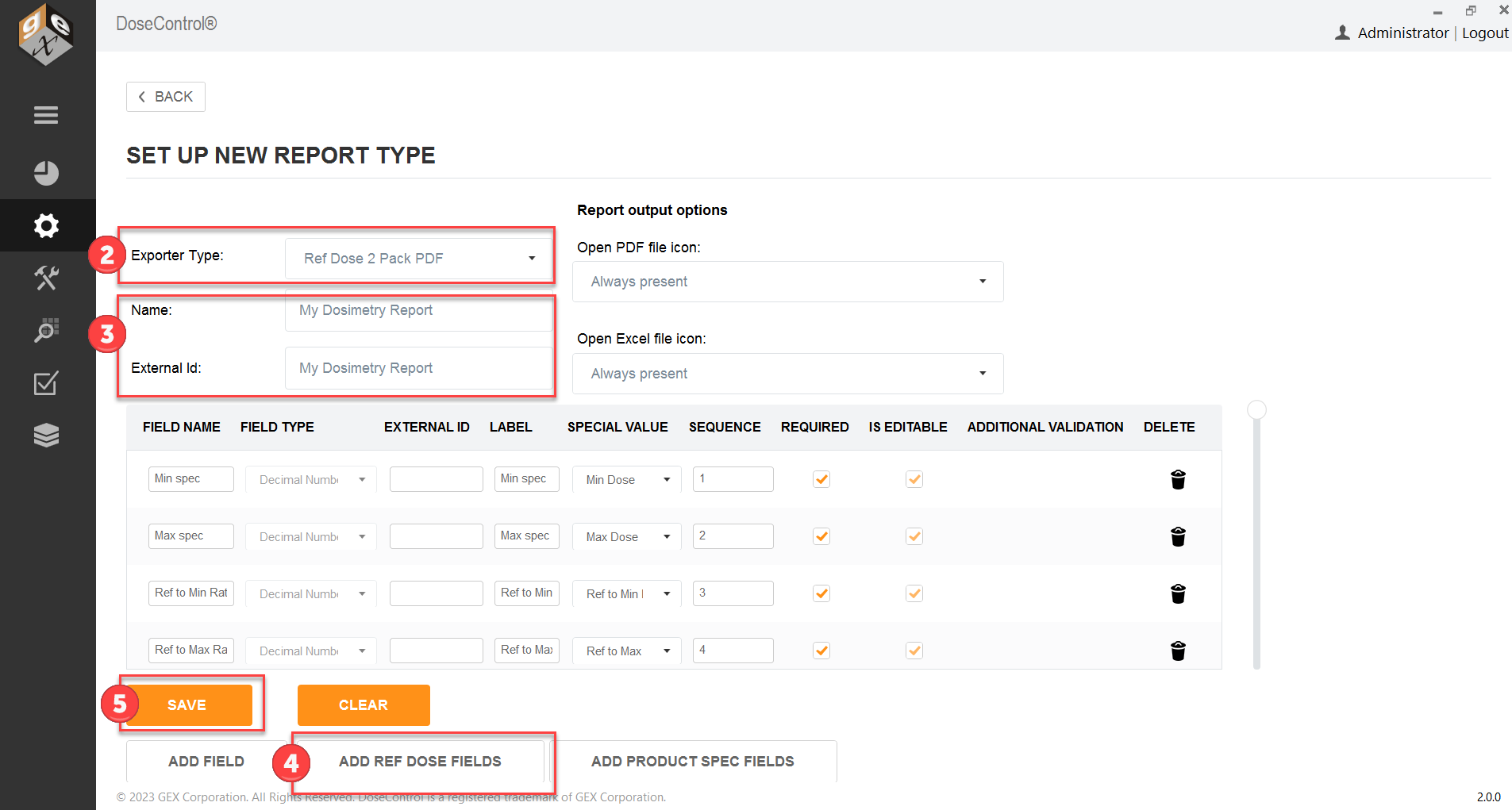
Ref Dose 2 Pack PDF - Setup instructions
Description: 2 dosimeters/pouch, routine process monitoring dosimetry with reference position information. All fields in the table below are included in this report.
Report Header Fields: Yes. See instructions below.
FIELD NAME:
|
DESCRIPTION:
|
FIELD TYPE:
|
SPECIAL VALUE FIELD:
|
Report ID:
|
Unique name/identifier of the report
|
Text
|
|
Report Version:
|
Version number of the report
|
Whole number
|
|
DSM Batch ID:
|
Dosimeter batch ID (from Calibration configuration)
|
Text
|
|
Catalog Number:
|
Identifying information item being processed
|
Text
|
|
Prepared by:
|
Username that is logged in at the time of report processing
|
Text
|
|
Date and Time:
|
Date/time report was processed; will say “not processed” for unprocessed report
|
Text
|
|
Instrument ID:
|
Spectrophotometer serial number (from Calibration configuration)
|
Text
|
|
Position:
|
Dosimeter position (reference, description)
|
Text
|
|
Carrier:
|
Carrier number/ID
|
Text
|
|
Absorbance:
|
Absorbance measurement of dosimeter 1
|
Decimal number
|
|
Thickness:
|
Dosimeter thickness
|
Decimal number
|
|
Calculated Dose (kGy)
|
Calculated dose in kGy (uses calibration coefficients in Calibration and Dmin or Dmax ratio)
|
Decimal number
|
|
Required Dose (kGy)
|
Required dose according to process specifications
|
Decimal number
|
|
Min spec
|
Minimum dose for the process
|
Decimal number
|
Min Dose
|
Max spec
|
Maximum dose for the process
|
Decimal number
|
Max Dose
|
Ref:Min Ratio
|
Ratio of min dose to the dosimeter reference position
|
Decimal number
|
Ref to Min Ratio
|
Ref:Max Ratio
|
Ratio of max dose to the dosimeter reference position
|
Decimal number
|
Ref to Max Ratio
|
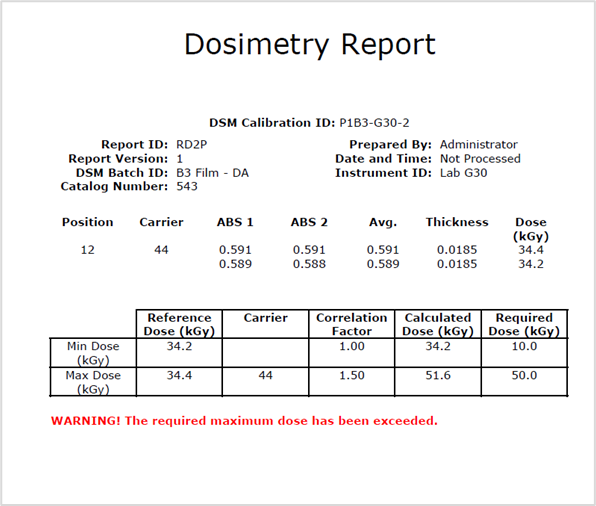
Report header setup
1 Go to Setup > Report Types
2 Select Ref Dose 2 Pack PDF from the Exporter Type selector.
3 Enter a Name. Copy the report Name into External Id.
4 Click the “Add Ref Dose Fields” button.
5 Click Save